Email Viewer / Editor
The Email Viewer / Editor area contains the email preview and release-specific information.
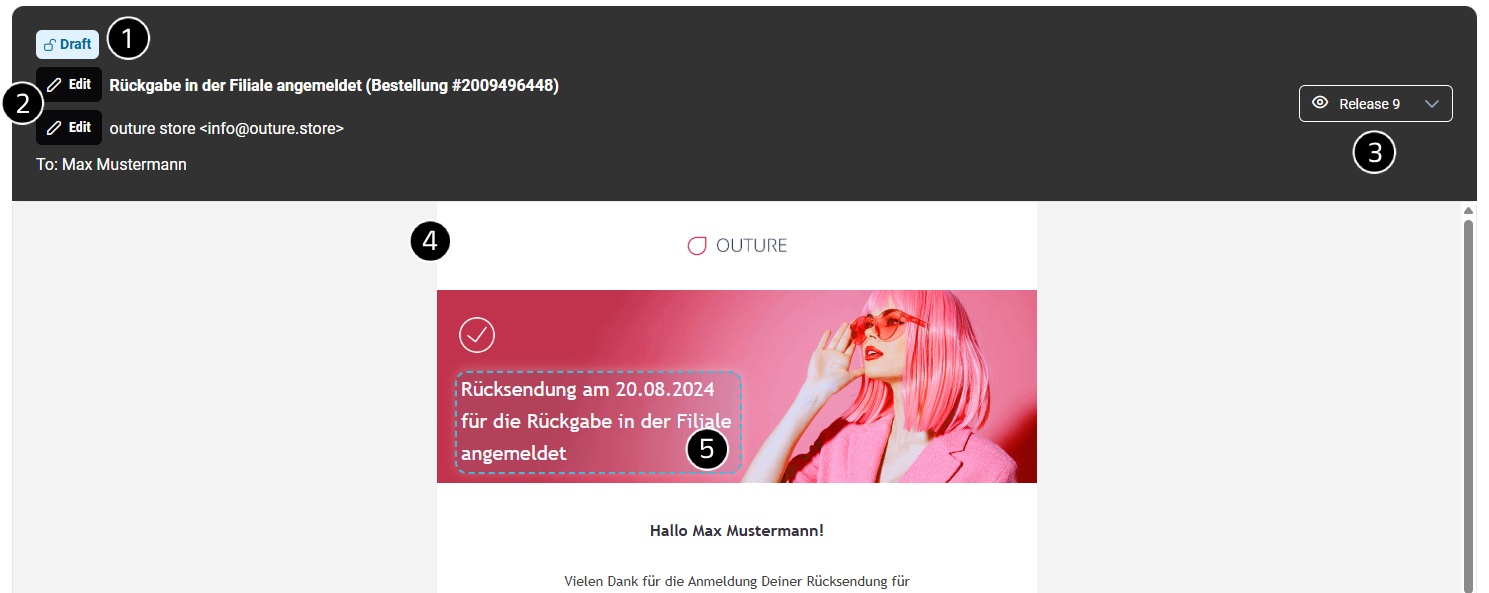
Draft Information
The status indicator shows whether the currently selected version is:
- A published release
- A draft release
This helps Contributors understand the current editing context at a glance.
Edit Subject & Sender
Subject lines and sender addresses can be edited using Rich Text Editor dialogs.
Editable elements include:
- Email subject
- Sender address
The sender can be configured:
- Globally for the module
- Specifically for an individual event
For event-specific sender addresses, the Override functionality must be used.
Info
The Override feature will be described in more detail in a future version of the documentation.
Release Information
The release selector displays the currently viewed release.
Users can:
- View the current release version
- Switch to previous releases
- Review historical content versions
This makes it easy to compare released content with current drafts.
Email Preview
The Email Preview displays the rendered output for the selected context.
The preview reflects the selected:
- Module
- Shipment
- Journey
- Event
- Country
- Language
- Carrier
Users can review how content will appear before publishing.
Rich Text Editor Highlighting
Editable elements are highlighted when Contributors hover over them.
Supported editable elements include:
- Text
- Images
- Buttons
- Links
When an editable element is selected, a Rich Text Editor dialog opens.
Typical editing actions include:
- Modify text
- Replace images
- Change links
- Update button labels
- Adjust content formatting
Tip
If an element is not highlighted, it is most likely configured as non-editable.