Module Selection
The module selector allows users to switch between the available Content Builder modules as well as infos on certain settings from Content Builder. Click on the selection to see more options.
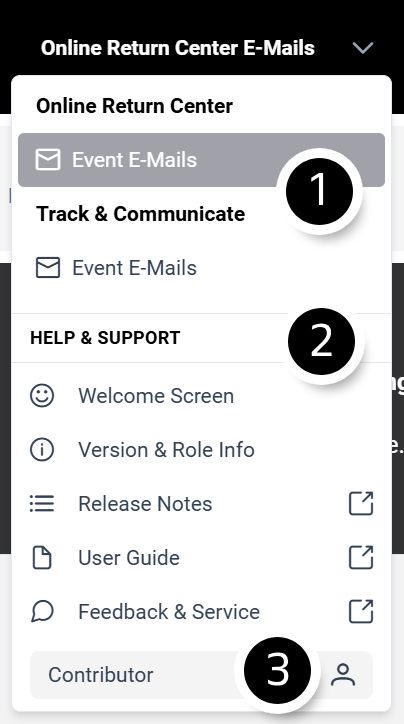
Module Selector
The module selector allows users to switch between the available CXC modules in Content Builder.
Available modules may include:
Online Return Center
Includes In-Store Return Center functionality if configured.
Track & Communicate
Email communication templates related to shipment tracking and customer notifications.
Help & Support
Welcome Screen
The Welcome Screen is displayed when logging in to the Content Builder. It provides an introductory slideshow that explains the basic functionalities and helps users get started quickly.
Version & Role Info
The Version & Role Info section provides details about the user's assigned role and the Client ID of the currently selected client. It also displays information about the current Content Builder release version and the MJML version in use.
Release Notes
The Release Notes section contains a link to the latest Content Builder Release Notes in the external documentation, where users can find information about new features, improvements, and bug fixes.
User Guide
The User Guide provides direct access to the external Content Builder documentation, offering detailed instructions and guidance on using the application.
Feedback & Service
The Feedback & Service section links to the JIRA Service Desk, where users can create service requests, change requests, ideas, and incident tickets related to the Content Builder.
Role Information
Here you can find which role you are assigned to (Viewer, Contributor, Administrator, Expert). Important for troubleshooting!